
Settings
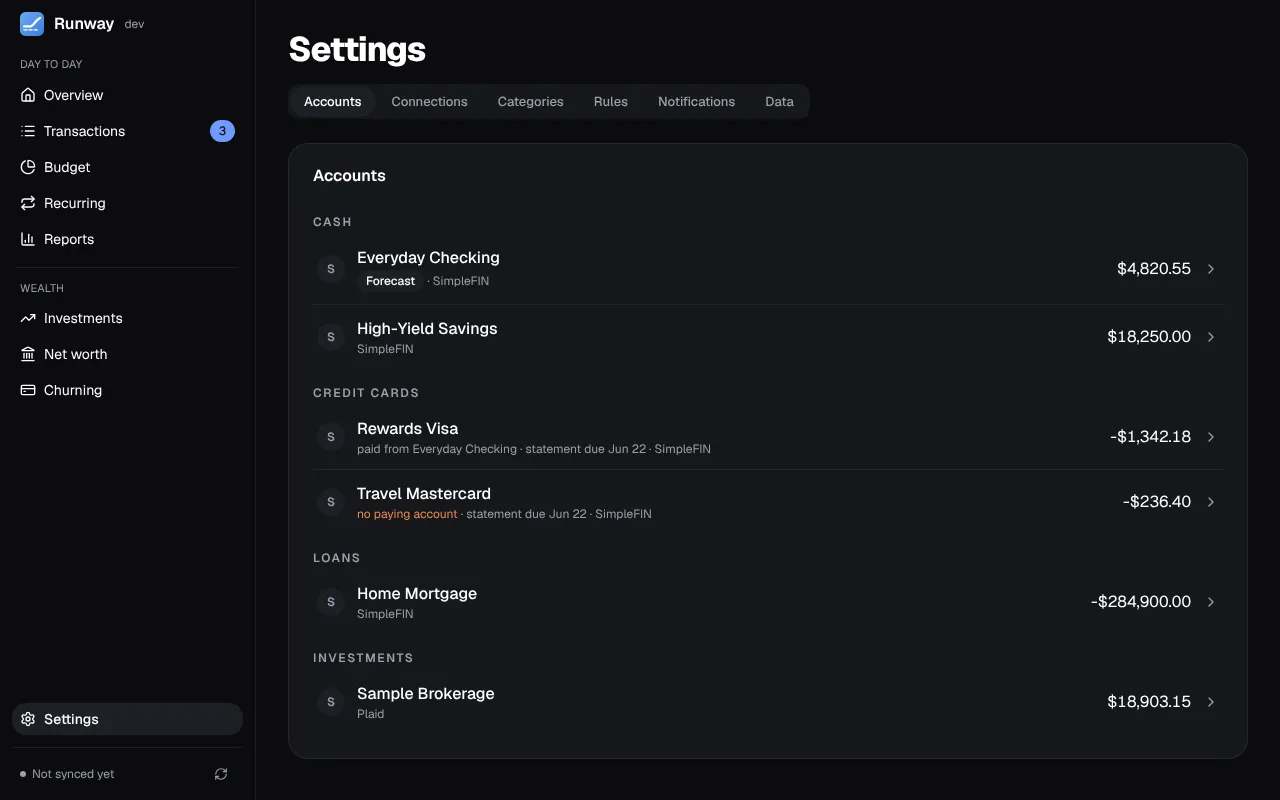
Settings has six tabs: Accounts, Connections, Categories, Rules, Notifications and Data. Until a bank is connected it opens on Connections.
Connections
Section titled “Connections”Two ways to connect a bank, one open at a time:
- SimpleFIN (recommended, about $15 a year): create a setup token in SimpleFIN Bridge and paste it in. The first sync pulls about six months of history, with balances, transactions and investment positions.
- Plaid, with your own developer keys: up to two years of history, and card statements, due dates and loan terms (Plaid Liabilities) where the bank shares them. Banks that sign you in on their own site send you back to
<RUNWAY_PUBLIC_URL>/plaid/oauth: add that address under Allowed redirect URIs in the Plaid Dashboard.
You can mix the two account by account. Switching an account’s source keeps its history; transactions both providers have are matched up so nothing is counted twice.
The optional services live here too: OpenRouter or Ollama for AI categorization and card lookups, Realie for home values, Finnhub for real-time prices, Logo.dev for merchant and bank logos, and the browser extension for Amazon, Target, Costco and Carta. A service with an error says Needs attention with the problem in a sentence. Keys are hidden as you type and stored encrypted.
Sync runs once a day at 7 AM in Runway’s time zone (TZ), late enough for overnight ACH, and whenever you press Sync now in the sidebar.
Refresh transactions early, beside each Plaid connection that brings in transactions, has Runway ask Plaid at 6:30 AM to fetch new transactions from the bank (Plaid’s Transactions Refresh), so the 7 AM sync gets the night’s activity. Plaid refreshes a whole connection, not single accounts. It starts on for a connection with a bank account and off for one with only credit cards; turning it off changes only that early fetch, and the daily sync goes on as before. When Plaid refuses the refresh 3 times in a row (once a day), Runway stops asking and the connection says Refresh paused with Plaid’s reason: fix the cause (reconnecting, say), then turn the switch off and on again to try again, or leave it off.
Accounts
Section titled “Accounts”Every account from your banks, with its source, balance and last sync.
- Rename or hide an account from its row. A hidden account is left out of lists, totals, the forecast and the investment pages; its transactions are kept.
- Use for the forecast marks the account Overview forecasts.
- Credit cards: the card’s Statement (the issuer’s through Plaid, or the one you enter: closing date, balance, due date and minimum), the account that pays it and how (Pay: in full, the minimum or a fixed amount).
- Loans: the interest rate and monthly payment, from the lender through Plaid or entered by you, for the loan’s paydown on Net worth and in the retirement plan.
- Owner: whose account it is, a label for Churning and the retirement plan.
- Delete an account, its transactions, statements and the rules that only apply to it. It stays deleted through syncs; Restore under the list brings it back with the next sync.
Categories and rules
Section titled “Categories and rules”Categories have one level of subcategories, each with an emoji, a colour and the card its spending goes on. Removing one that’s in use asks where its transactions should go. Rules categorize, rename, split or send transactions to review.
Notifications
Section titled “Notifications”Web Push to your phone or computer: a card payment coming up, the forecast getting low, a recurring payment that didn’t show up, a large charge, a sync that keeps failing, the browser extension waiting for a store sign-in, and Churning’s deadlines. Each alert is sent once, and notifications are each person’s own. Turn them on from the device that should get them (inside the installed app on an iPhone); the Devices list shows each one. Setting up the app on a phone is in Phone, backups and Postgres.
- App lock: Face ID, Touch ID or the device’s passcode before Runway shows anything on this device, when you open it and when you come back after 1, 5 or 15 minutes in the background. Each device turns it on for itself, and signing out turns it off. See App lock.
- Backup and restore: one file holding everything, restorable into SQLite or Postgres. Choosing a file shows what it holds before Restore asks you to type
RESTORE; a copy of what was there is kept in the data directory. See Backups. - AI assistants (MCP): Runway’s address for assistants, the ones you’ve approved (with Disconnect), and the switches that let them change churning, categorize, or change anything. See AI assistants.
- Version: the release you’re running.